
Tile Leveling Clip Placement Drawing: Openings & Cut Edges
Do not apply one clips-per-tile number to perimeters, openings, movement joints, cut pieces and mixed-format junctions.
ZEBRA manufactures clip-and-wedge systems for distributors and installation teams, and this tile leveling clip placement guide addresses the point where a square-metre estimate stops being enough. It shows estimators how to turn a real tile layout into a reviewable position count around openings, cuts and mixed formats without inventing a universal placement spacing.
Bottom line: mark the tile geometry first, classify every edge, and count only the clip positions supported by the selected system detail.
Tile Leveling Clip Placement Starts With 5 Edge Types
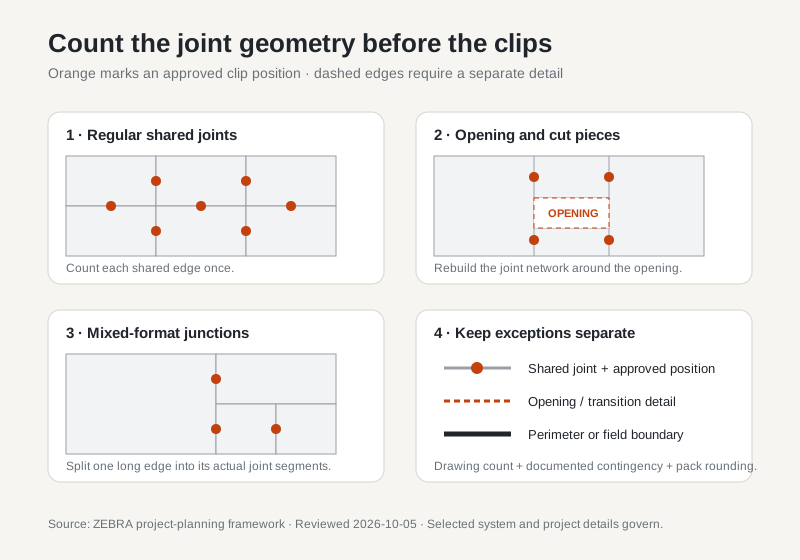
Use five labels before drawing any clip symbol: shared joint, perimeter, opening, cut edge and movement joint. A shared joint connects adjacent tile edges and may receive clips under the chosen system. A perimeter terminates the tiled field. An opening interrupts the grid. A cut edge describes how a tile was formed, not automatically whether it receives a clip. A movement joint is a designed accommodation detail and must not be converted into an ordinary restrained joint by a generic sketch.
Give each tile or repeatable module an ID. Add dimensions, orientation and joint width where known. When the drawing contains an assumption, label it as an assumption rather than presenting it as a product requirement.
Use a 4-Pass Placement Drawing Method
- Draw the finished tile field. Include room edges, columns, niches, doorways, drains and other interruptions that change the joint network.
- Trace shared edges. Mark only edges where two tiles meet. Do not count the same edge once for each tile.
- Apply the selected system detail. Transfer the manufacturer-approved positions to each qualifying edge, including any model-specific restrictions.
- Count by zone and revision. Total the marked symbols, record the drawing revision and keep project contingency separate from the geometry count.
This process makes the estimate auditable. If the layout changes, the estimator can identify which zone and which edges changed instead of applying a blanket percentage to the whole project.
Openings Change the Joint Network, Not the Product Rule
A doorway, niche or service opening removes full tiles and creates shorter pieces, returns or terminations. Draw the opening at finished dimensions, then show the actual tile cuts around it. Count the remaining shared edges from that geometry. An opening does not justify a universal percentage surcharge because two openings with the same area can produce very different joint patterns.
Distinguish the tiled face from trims, profiles and returns. A clip designed to control two coplanar tile edges should not be assumed to control a change of plane. Use the detail specified for that transition and confirm that tightening and removal remain physically accessible.
Cut Edges Need Classification Before Counting
A cut tile can still share a normal joint with its neighbour. In that case, mark the joint and apply the approved system detail. A cut tile can also terminate at a wall, trim, drain or expansion detail; those conditions need their own construction detail and should not inherit a shared-joint symbol automatically.
Small or fragile pieces require particular care. The drawing should flag them for installer review rather than asserting that additional tension will solve the condition. Clip pressure cannot repair a weak cut, inadequate support or an out-of-plane substrate.
Mixed Formats Must Be Counted Edge by Edge
In a mixed-format pattern, one long edge may meet two or more shorter tiles. Treat those as separate joint segments in the drawing. Do not assume that a symbol at one intersection controls the whole long edge. Confirm placement from the selected system instructions and show each approved position visibly.
For procurement, subtotal the positions by system, clip model and joint width. A visual total without product identity is insufficient when a project uses more than one clip thickness or tile-thickness range.
When Can You Use the 11 Clips/m² Planning Figure?
The site's disclosed regular-grid planning model gives approximately 11 clips/m² for 60×60cm tile. Use that as an early quantity reference for the stated format and regular layout, then replace it with the selected system drawing when openings, cut-heavy zones, mixed formats or model-specific positioning matter. The tile leveling clip quantity guide explains the area calculation and its limits.
Keep three numbers separate: drawing count, documented project contingency and purchase quantity after pack rounding. Record who selected the contingency and why. There is no universal waste percentage that applies to every crew, pattern and system.
The Drawing Cannot Correct Four Installation Conditions
A clip drawing does not establish substrate flatness, tile warpage, mortar coverage or movement-joint design. Review those conditions independently. MAPEI's tile installer manual also tells installers to remove fresh adhesive from around clips so cured material does not interfere with removal. Follow the mortar and leveling-system instructions for setting, cure and removal rather than placing an unsupported time value on the drawing.
Before release, connect the position schedule to the exact tile leveling clips, joint width and tile-thickness range being approved. Buyers can then send the drawing, quantity and selected models through the tile tool RFQ builder without losing the assumptions behind the count.
Frequently Asked Questions
Where should tile leveling clips appear on a placement drawing?
Mark clips only where the selected system is intended to control two adjacent tile edges. Identify perimeter edges, movement joints, openings and unfinished work boundaries separately because they do not all behave like an ordinary shared joint.
Should every tile use the same number of leveling clips?
No. Clip positions depend on tile dimensions, joint geometry, layout pattern, openings and the selected system instructions. A regular grid may support a simple planning estimate, while a cut-heavy or mixed-format layout requires an edge-by-edge drawing.
Do cut edges automatically need extra tile leveling clips?
No universal extra-clip rule applies. A cut edge that meets another tile is still an active joint, but a cut edge at a perimeter, trim or opening may need a different detail. Follow the project detail and system instructions instead of adding an unverified multiplier.
Can a clip placement drawing replace the installation specification?
No. The drawing is a quantity and coordination record. Substrate flatness, mortar selection and coverage, movement joints, tile warpage, cure and removal remain governed by the applicable project documents and manufacturer instructions.
Turn the Layout Into a Reviewable Clip Schedule
Send the tile sizes, joint width, drawing and selected system so the quantity assumptions can be reviewed.
Discuss the project schedule →